
커뮤니티
라운드 피겨 가격

2024-02-21 10:11:24
2113
글번호 176797
첨부 이미지
그림1
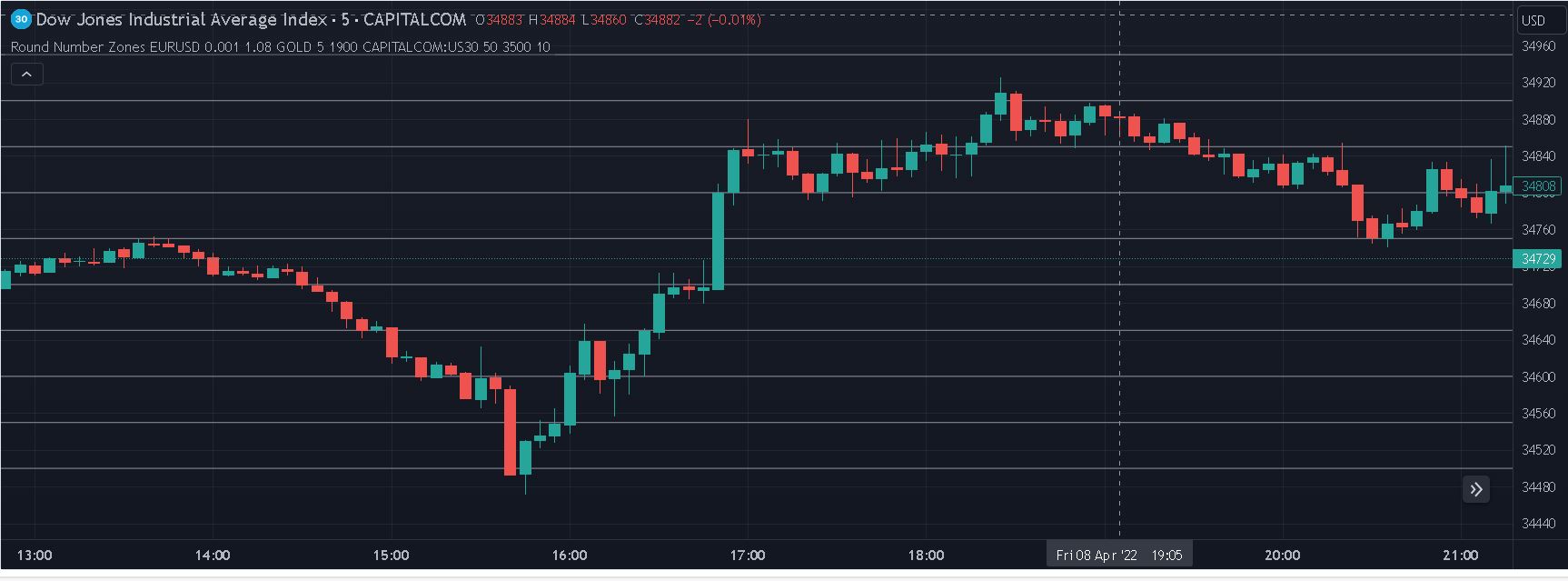
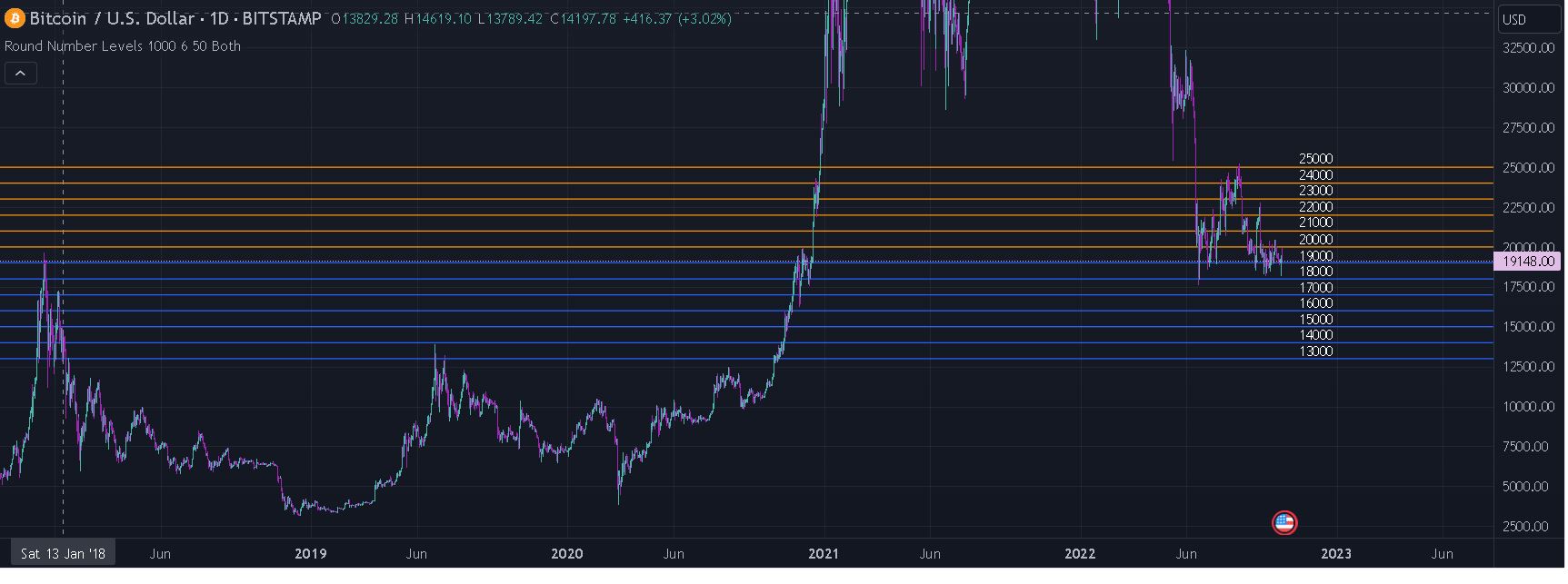
그림2
감사합니다
가격 호가범위가 510000원 520000원 처럼 변할 때 호가의 만단위 10000, 20000, ~
가격 호가범위가 11000윈 12000원 처럼 변할 때 호가의 천단위 1000, 2000, 3000 ~
가격 호가범위가 3100원 3200원 처럼 변할 때 호가의 백단위 100, 200, 300 ~
가격 호가범위가 500원 600원처럼 변할 딱 호가의 십단위 500, 600 ~
위 처럼 각 호가 단위의 십단위, 백단위, 천단위, 만단위, 십만단위의 일명 라운드 피겨가격을
자동/수동으로 그리고 싶습니다.
호가변동과 무관하게 지표만 그려도 되고 호가가 종가상으로 라운드 피겨가격을
돌파했을 때 지표를 그려도 됩니다
라운드 피겨 가격 개념
우리가 라운드 피겨라고 부르는 단어는 사실 라운드 넘버
(Round number)로 사용되고 있습니다. 라운드 넘버의
뜻은 '주어진 자릿수에서 하나 이상의 0으로 끝나는 숫자
들을 비공식적으로 부르는 것'입니다. 713이라는 숫자보
다는 710이, 710보다는 700이 더 라운드 넘버에 가깝습
니다. 즉 100, 500, 800, 1000, 10000 같이 딱딱 떨어지
는 숫자들을 지칭합니다.
1
Round 사용자 함수를 만들고 싶습니다.
위의 개념과 유사한 트레이딩 뷰 지표를 찾아봤습니다.
변환하여 쓸 수 있으면 좋겠습니다.
인서트 영어는 쓰기금지 되어있다기에 한글로 써봅니다.
2 Round Number Levels
// This source code is subject to the terms of the Mozilla Public License 2.0 at https://mozilla.org/MPL/2.0/
// © melodicfish
//@version=5
indicator("Round Number Levels",overlay = true,max_labels_count = 101,max_lines_count = 101)
incrementVal=input.float(defval=500, title="Unit Place Rounding Value", tooltip = "The Unit Place that a number will be rounded and distance between rounded levels. Example Value setting of 100 and a price of 225.00 would result in a line level value of 200.00; Where a price of 265.00 would result in a line level value of 300 with the same value setting of 100")
lQty=input.int(defval=2,minval=1,maxval=50, title="Line Amount",tooltip = "Each Line Amount increase will add a line level above and below baseline level; Baseline = line nearest to price) ")
offset=input.int(defval=50,minval=0, maxval=490,step=10, title="Line Price Horizontal Offset",inline = "a")
textCol=input.color(defval = color.white,title="Price Label Text Color",tooltip = "Use Horizontal Offset to adjust the X position of the price labels. To hide price labels disable Labels on the style tab",inline = "a")
belowColor=input.color(defval = color.blue,title="Line Color Below price",inline="b")
aboveColor=input.color(defval = color.orange,title="Line Color Above price",inline="b")
ext=input.string(defval = "To Right",options = ["To Right","Both"],title="Extend Line: ")
float iv= incrementVal
lQty:=lQty+1
var lines=array.new_line(lQty*2)
var labels=array.new_label(lQty*2)
var line baseLine=na
RoundValue(value) =>
math.round(value / iv) * iv
baseVal=RoundValue(close)
if barstate.isconfirmed and baseVal!= baseVal[1]
for i = 0 to (lQty*2) - 1
line.delete(array.get(lines,i))
label.delete(array.get(labels,i))
lines:=array.new_line(lQty*2)
labels:=array.new_label(lQty*2)
for j = 0 to lQty - 1
newLine=line.new(bar_index,baseVal+(j*iv),bar_index+1,baseVal+(j*iv),extend=ext=="Both"?extend.both:extend.right,color=close>baseVal+(j*iv)?belowColor:aboveColor)
newLabel=label.new(bar_index+1+offset,baseVal+(j*iv),text=str.tostring(baseVal+(j*iv)),style= label.style_none,textcolor = textCol, textalign=text.align_right)
array.인서트(lines,j,newLine)
array.인서트(labels,j,newLabel)
for k = 1 to lQty - 1
newLine=line.new(bar_index,baseVal-(k*iv),bar_index+1,baseVal-(k*iv),extend=ext=="Both"?extend.both:extend.right,color=belowColor)
newLabel=label.new(bar_index+1+offset,baseVal-(k*iv),text=str.tostring(baseVal-(k*iv)),style= label.style_none,textcolor = textCol, textalign=text.align_right)
array.인서트(lines,k+lQty,newLine)
array.인서트(labels,k+lQty,newLabel)
else if barstate.isconfirmed and baseVal== baseVal[1]
line.set_color(array.get(lines,0),color=close>baseVal?belowColor:aboveColor)
for l = 0 to (lQty*2)-1
label.set_x(array.get(labels,l),bar_index+1+offset)
3 Round Number Zones.
// This source code is subject to the terms of the Mozilla Public License 2.0 at https://mozilla.org/MPL/2.0/
// © trading-guide
//@version=5
indicator("Round Number Zones", overlay=true)
line_col = input(color.gray, title ="Line color")
line_width = input.int(2, title = "Line width", minval = 1, maxval = 5)
line_count = input.int(title="Line count", defval=10)
line_count_2 = math.floor(line_count / 2)
// Symbol 1 : EURUSD default
show_sym_1 = input.bool(title="Show", defval=true, inline="2")
sym_1 = input.symbol("EURUSD",title=" ", inline="2")
sym_1_steps = input.float(title="+/-", defval=0.001, inline="2")
sym_1_sec = request.security(sym_1,timeframe.period, close)
sym_1_use_custom_price = input.bool(title="Custom Price", defval=false, inline="3")
sym_1_custom_price = input.float(title="", defval=1.08, inline="3")
// Symbol 2 : GOLD default
show_sym_2 = input.bool(title="Show", defval=true, inline="4")
sym_2 = input.symbol("GOLD",title=" ", inline="4")
sym_2_steps = input.float(title="+/-", defval=5, inline="4")
sym_2_sec = request.security(sym_2,timeframe.period, close)
sym_2_use_custom_price = input.bool(title="Custom Price", defval=false, inline="5")
sym_2_custom_price = input.float(title="", defval=1900, inline="5")
// Symbol 3 : US30 default
show_sym_3 = input.bool(title="Show", defval=true, inline="6")
sym_3 = input.symbol("US30",title=" ", inline="6")
sym_3_steps = input.float(title="+/-", defval=50, inline="6")
sym_3_sec = request.security(sym_3,timeframe.period, close)
sym_3_use_custom_price = input.bool(title="Custom Price", defval=false, inline="7")
sym_3_custom_price = input.float(title="", defval=3500, inline="7")
draw_line(sym, show, steps, custom, custom_price) =>
if sym == syminfo.prefix + ":" +syminfo.ticker and show
for i = 0 to line_count - 1
price = custom ? custom_price : close
step = math.ceil(price / steps) * steps + (i * steps) - (line_count_2 * steps)
line.new(bar_index, step, bar_index - 1, step, xloc=xloc.bar_index, extend=extend.both, color=line_col, width=line_width, style=line.style_dotted)
draw_line(sym_1, show_sym_1, sym_1_steps, sym_1_use_custom_price, sym_1_custom_price)
draw_line(sym_2, show_sym_2, sym_2_steps, sym_2_use_custom_price, sym_2_custom_price)
draw_line(sym_3, show_sym_3, sym_3_steps, sym_3_use_custom_price, sym_3_custom_price)
- 1. 177627_캡처.JPG (0.12 MB)
- 2. 177627_1.JPG (0.15 MB)
답변 1

예스스탁 예스스탁 답변
2024-02-21 10:49:50
안녕하세요
예스스탁입니다.
아래식 적용하시면 됩니다.
단위값은 지정하셔야 합니다.
올리신 트레이딩뷰 수식을 보셔서 아시겠지만
해당 식들도 단위는 지정하게 되어 있습니다.
input : R(1000),color(Gray);
var : cnt(0);
Array : TL[100](0),TX[100](0);
var1 = Ceiling(C/R)*R;
Var2 = var1-R*50;
For cnt = 0 to 99
{
TL_Delete(TL[cnt]);
TL[cnt] = TL_New(sDate,sTime,var2+R*cnt,NextBarSdate,NextBarStime,var2+R*cnt);
TL_SetExtLeft(TL[cnt],true);
TL_SetColor(TL[cnt],color);
Text_Delete(TX[cnt]);
TX[cnt] = Text_New(NextBarSdate,NextBarStime,Var2+R*cnt,NumToStr(Var2+R*cnt,0));
Text_SetStyle(TX[cnt],0,2);
}
즐거운 하루되세요
> jdavid 님이 쓴 글입니다.
> 제목 : 라운드 피겨 가격
> 감사합니다
가격 호가범위가 510000원 520000원 처럼 변할 때 호가의 만단위 10000, 20000, ~
가격 호가범위가 11000윈 12000원 처럼 변할 때 호가의 천단위 1000, 2000, 3000 ~
가격 호가범위가 3100원 3200원 처럼 변할 때 호가의 백단위 100, 200, 300 ~
가격 호가범위가 500원 600원처럼 변할 딱 호가의 십단위 500, 600 ~
위 처럼 각 호가 단위의 십단위, 백단위, 천단위, 만단위, 십만단위의 일명 라운드 피겨가격을
자동/수동으로 그리고 싶습니다.
호가변동과 무관하게 지표만 그려도 되고 호가가 종가상으로 라운드 피겨가격을
돌파했을 때 지표를 그려도 됩니다
라운드 피겨 가격 개념
우리가 라운드 피겨라고 부르는 단어는 사실 라운드 넘버
(Round number)로 사용되고 있습니다. 라운드 넘버의
뜻은 '주어진 자릿수에서 하나 이상의 0으로 끝나는 숫자
들을 비공식적으로 부르는 것'입니다. 713이라는 숫자보
다는 710이, 710보다는 700이 더 라운드 넘버에 가깝습
니다. 즉 100, 500, 800, 1000, 10000 같이 딱딱 떨어지
는 숫자들을 지칭합니다.
1
Round 사용자 함수를 만들고 싶습니다.
위의 개념과 유사한 트레이딩 뷰 지표를 찾아봤습니다.
변환하여 쓸 수 있으면 좋겠습니다.
인서트 영어는 쓰기금지 되어있다기에 한글로 써봅니다.
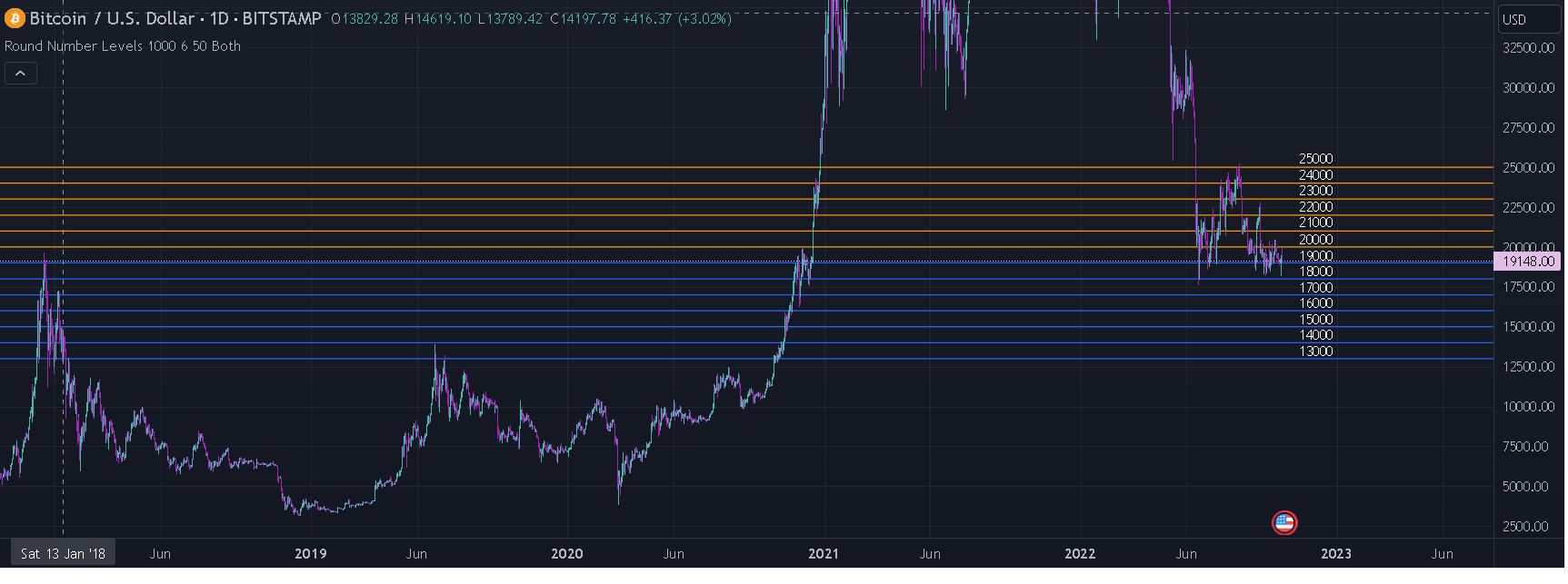
2 Round Number Levels
// This source code is subject to the terms of the Mozilla Public License 2.0 at https://mozilla.org/MPL/2.0/
// © melodicfish
//@version=5
indicator("Round Number Levels",overlay = true,max_labels_count = 101,max_lines_count = 101)
incrementVal=input.float(defval=500, title="Unit Place Rounding Value", tooltip = "The Unit Place that a number will be rounded and distance between rounded levels. Example Value setting of 100 and a price of 225.00 would result in a line level value of 200.00; Where a price of 265.00 would result in a line level value of 300 with the same value setting of 100")
lQty=input.int(defval=2,minval=1,maxval=50, title="Line Amount",tooltip = "Each Line Amount increase will add a line level above and below baseline level; Baseline = line nearest to price) ")
offset=input.int(defval=50,minval=0, maxval=490,step=10, title="Line Price Horizontal Offset",inline = "a")
textCol=input.color(defval = color.white,title="Price Label Text Color",tooltip = "Use Horizontal Offset to adjust the X position of the price labels. To hide price labels disable Labels on the style tab",inline = "a")
belowColor=input.color(defval = color.blue,title="Line Color Below price",inline="b")
aboveColor=input.color(defval = color.orange,title="Line Color Above price",inline="b")
ext=input.string(defval = "To Right",options = ["To Right","Both"],title="Extend Line: ")
float iv= incrementVal
lQty:=lQty+1
var lines=array.new_line(lQty*2)
var labels=array.new_label(lQty*2)
var line baseLine=na
RoundValue(value) =>
math.round(value / iv) * iv
baseVal=RoundValue(close)
if barstate.isconfirmed and baseVal!= baseVal[1]
for i = 0 to (lQty*2) - 1
line.delete(array.get(lines,i))
label.delete(array.get(labels,i))
lines:=array.new_line(lQty*2)
labels:=array.new_label(lQty*2)
for j = 0 to lQty - 1
newLine=line.new(bar_index,baseVal+(j*iv),bar_index+1,baseVal+(j*iv),extend=ext=="Both"?extend.both:extend.right,color=close>baseVal+(j*iv)?belowColor:aboveColor)
newLabel=label.new(bar_index+1+offset,baseVal+(j*iv),text=str.tostring(baseVal+(j*iv)),style= label.style_none,textcolor = textCol, textalign=text.align_right)
array.인서트(lines,j,newLine)
array.인서트(labels,j,newLabel)
for k = 1 to lQty - 1
newLine=line.new(bar_index,baseVal-(k*iv),bar_index+1,baseVal-(k*iv),extend=ext=="Both"?extend.both:extend.right,color=belowColor)
newLabel=label.new(bar_index+1+offset,baseVal-(k*iv),text=str.tostring(baseVal-(k*iv)),style= label.style_none,textcolor = textCol, textalign=text.align_right)
array.인서트(lines,k+lQty,newLine)
array.인서트(labels,k+lQty,newLabel)
else if barstate.isconfirmed and baseVal== baseVal[1]
line.set_color(array.get(lines,0),color=close>baseVal?belowColor:aboveColor)
for l = 0 to (lQty*2)-1
label.set_x(array.get(labels,l),bar_index+1+offset)
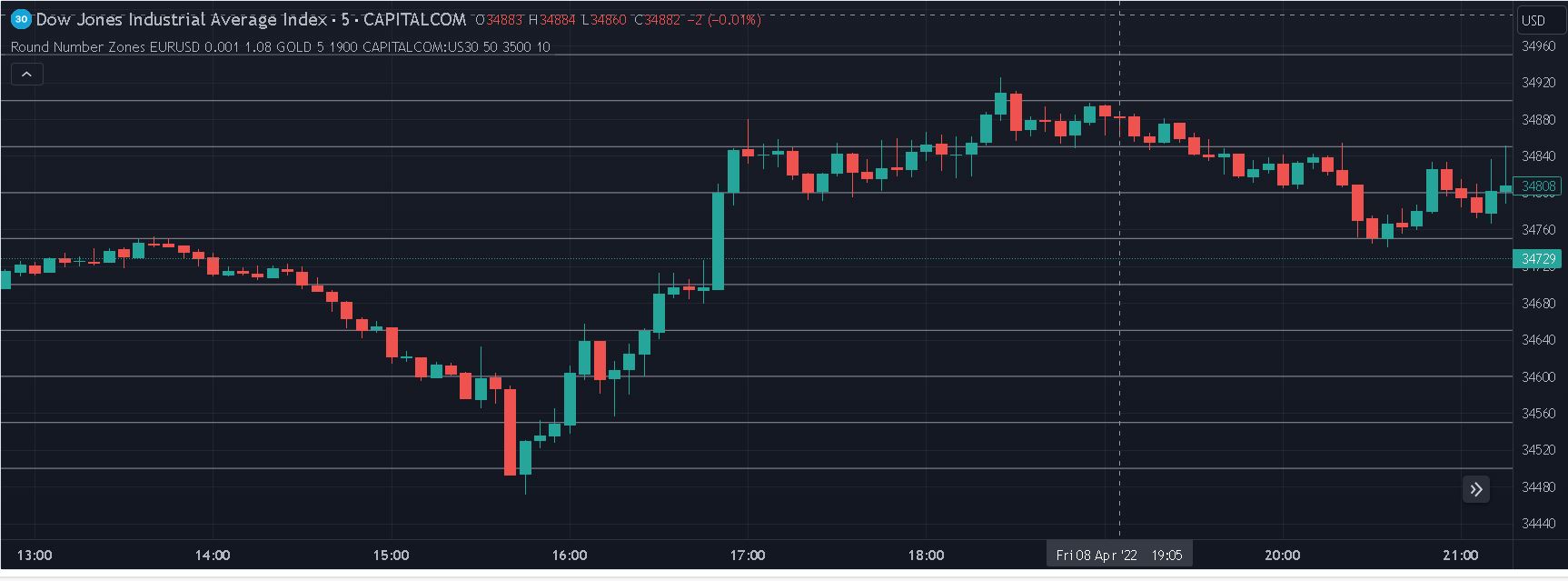
3 Round Number Zones.
// This source code is subject to the terms of the Mozilla Public License 2.0 at https://mozilla.org/MPL/2.0/
// © trading-guide
//@version=5
indicator("Round Number Zones", overlay=true)
line_col = input(color.gray, title ="Line color")
line_width = input.int(2, title = "Line width", minval = 1, maxval = 5)
line_count = input.int(title="Line count", defval=10)
line_count_2 = math.floor(line_count / 2)
// Symbol 1 : EURUSD default
show_sym_1 = input.bool(title="Show", defval=true, inline="2")
sym_1 = input.symbol("EURUSD",title=" ", inline="2")
sym_1_steps = input.float(title="+/-", defval=0.001, inline="2")
sym_1_sec = request.security(sym_1,timeframe.period, close)
sym_1_use_custom_price = input.bool(title="Custom Price", defval=false, inline="3")
sym_1_custom_price = input.float(title="", defval=1.08, inline="3")
// Symbol 2 : GOLD default
show_sym_2 = input.bool(title="Show", defval=true, inline="4")
sym_2 = input.symbol("GOLD",title=" ", inline="4")
sym_2_steps = input.float(title="+/-", defval=5, inline="4")
sym_2_sec = request.security(sym_2,timeframe.period, close)
sym_2_use_custom_price = input.bool(title="Custom Price", defval=false, inline="5")
sym_2_custom_price = input.float(title="", defval=1900, inline="5")
// Symbol 3 : US30 default
show_sym_3 = input.bool(title="Show", defval=true, inline="6")
sym_3 = input.symbol("US30",title=" ", inline="6")
sym_3_steps = input.float(title="+/-", defval=50, inline="6")
sym_3_sec = request.security(sym_3,timeframe.period, close)
sym_3_use_custom_price = input.bool(title="Custom Price", defval=false, inline="7")
sym_3_custom_price = input.float(title="", defval=3500, inline="7")
draw_line(sym, show, steps, custom, custom_price) =>
if sym == syminfo.prefix + ":" +syminfo.ticker and show
for i = 0 to line_count - 1
price = custom ? custom_price : close
step = math.ceil(price / steps) * steps + (i * steps) - (line_count_2 * steps)
line.new(bar_index, step, bar_index - 1, step, xloc=xloc.bar_index, extend=extend.both, color=line_col, width=line_width, style=line.style_dotted)
draw_line(sym_1, show_sym_1, sym_1_steps, sym_1_use_custom_price, sym_1_custom_price)
draw_line(sym_2, show_sym_2, sym_2_steps, sym_2_use_custom_price, sym_2_custom_price)
draw_line(sym_3, show_sym_3, sym_3_steps, sym_3_use_custom_price, sym_3_custom_price)
다음글
이전글